
he Challenge
HRS Coding regularly develops presentations for clients, conference sessions, internal training, and sales conversations. Over time, multiple team members created slides using different layouts, colors, fonts, and formatting approaches. While the content was strong, the visual experience varied significantly from presentation to presentation.
The goal was to redesign the SlideMasters used by the team, but we uncovered a deeper need throughout the revision process.
We discovered that the team needed a system that would allow any member—regardless of design experience—to build professional, brand-consistent presentations without requiring marketing support for every deck.
To accomplish this, I developed a comprehensive PowerPoint template, brand standards documentation, editing rules, alignment guides, and user training materials that transformed presentation creation from a design challenge into a repeatable process.
The Approach
Rather than relying solely on slide layouts, I approached the project as a brand governance and user experience challenge.
The template needed to balance two competing priorities:
- Protect the HRS brand
- Give employees enough flexibility to create custom content
The solution included four key components:
1. Brand Standards for Presentations
The first step was translating the broader HRS visual identity into presentation-specific guidelines.
This included:
- Primary, secondary, and tertiary color palettes
- Approved font usage
- Logo placement requirements
- Decorative element standards
- Clear examples of acceptable and unacceptable modifications
Rather than creating a restrictive style guide, the standards were written in plain language so non-designers could confidently make decisions while staying within brand boundaries.
2. A Visual Grid System
One of the biggest challenges for non-designers is alignment.
Most people know when a slide feels “off,” but they don’t know why.
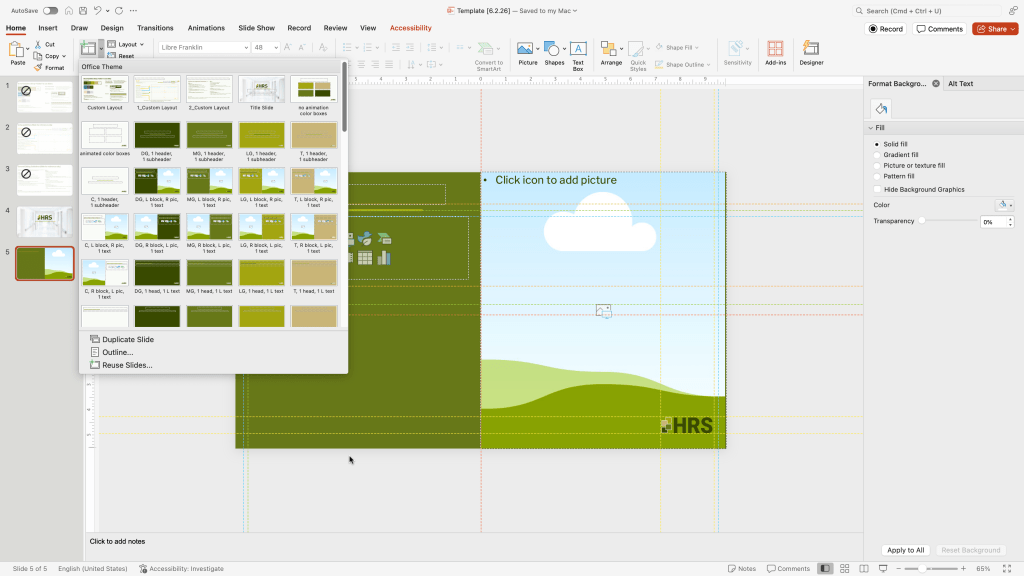
To solve this, I built a color-coded guide system directly into the template.
The guides establish:
- Header placement
- Content margins
- Decorative element positioning
- Center alignment references
- Logo placement zones
Instead of teaching design theory, the system gives users a practical framework: if content aligns to the guides, the slide will remain visually balanced and consistent.
This dramatically reduces formatting errors while allowing users to customize content layouts when needed.
3. PowerPoint Governance Rules
Many templates fail because users eventually modify master slides, recreate graphics, or make design decisions that gradually erode consistency.
To prevent this, I created a detailed set of editing rules covering:
- What users may modify
- What must remain unchanged
- How to build custom slides
- Proper logo usage
- Approved typography
- Brand color requirements
- Slide Master restrictions
The guidelines empower employees to make changes confidently without accidentally breaking the visual system.
4. User Training & Adoption
Even the best template fails if people don’t know how to use it.
To support adoption, I created quick-start documentation and embedded instructional slides directly within the template. These hidden reference slides walk users through:
- Saving and using the template
- Selecting layouts
- Adding new slides
- Working with placeholders
- Using alignment guides
- Creating custom slides while maintaining brand consistency
The training materials reduce onboarding time and allow new employees to become productive immediately without requiring one-on-one support.
The Result
The final deliverable was more than a PowerPoint file.
It was a scalable presentation system that allows the HRS team to:
- Create professional presentations independently
- Maintain brand consistency across departments
- Reduce reliance on marketing for routine deck creation
- Improve presentation quality and readability
- Accelerate content development while protecting brand standards
Most importantly, the project shifted presentation creation from a design-dependent process to a repeatable business process.
When organizations invest in systems instead of one-off assets, they gain something far more valuable than a template: they gain consistency, efficiency, and confidence across every presentation their team creates.
Skills Demonstrated
- Brand Strategy
- Visual Identity Systems
- Presentation Design
- PowerPoint Template Development
- User Experience Design
- Internal Communications
- Change Management
- Documentation & Training Development
- Marketing Operations
- Stakeholder Enablement

